Your stream runs.
24/7, on autopilot.
Upload videos, build looping playlists, and go live on YouTube, Twitch, or any RTMP destination — fully automated. No PC needed.
Why stream around the clock?
A continuously scheduled stream can keep working for your channel long after you’ve logged off. Here’s what that unlocks.
Reach viewers in every timezone
Your audience is global, but you can’t be awake for all of it. With a 24/7 stream, someone in every part of the world can tune in — day and night.
More chances to get discovered
The more hours you’re live, the more moments there are for someone to find you. A continuously scheduled channel can have something playing when a new viewer scrolls past — instead of a page that’s only live once in a while.
Grow while you’re away
No daily uploads or editing marathons. Your scheduled channel can keep working in the background while you sleep, work, or create your next thing.
A channel with content ready to play
A continuously scheduled channel gives visitors something to watch when they arrive — instead of landing on a page that is only live occasionally.
Forget the technical nightmare.
The traditional way means a PC running all night, manual software configs, and waking up to a crashed stream. There's a better way.
The old way
- Leave your PC running 24/7 — electricity costs add up fast
- Stream drops while you sleep — nobody notices until morning
- Hours spent setting up software and figuring out stream settings
- No way to schedule streams ahead of time
- Manual restart every time it crashes or disconnects
With streamrunnr
- Runs on dedicated infrastructure — your PC stays off
- Continuous monitoring with automatic recovery attempts
- Easy setup, no technical knowledge required
- Stream to YouTube, Twitch, or any RTMP destination
- Designed for continuous streaming with automatic recovery
Live in three steps
No technical knowledge needed. Just upload, configure, and start.
Upload your content
Add your videos to your library. All common formats work — we convert them to stream-ready quality automatically.
Configure your stream
Pick a single video or build a looping playlist. Choose your platform, paste your stream key, and you're set.
Go live
Hit “Go Live.” streamrunnr takes it from there on hosted infrastructure, with automatic recovery attempts and no PC needed.
Everything you need to stream 24/7
Upload, connect, go live. streamrunnr handles everything in between — no technical knowledge needed.
Just upload — we do the rest
Drag-and-drop a supported video file and we prepare it for streaming. Common formats and resolutions up to 4K are supported.
Keep playlists looping
Order your videos and enable loop. streamrunnr cycles through your playlist repeatedly until you stop the stream or change its configuration.
Stream to RTMP destinations
Push to YouTube, Twitch, or any custom RTMP endpoint. Run multiple streams simultaneously from a single dashboard.
Reliable by design
Built on dedicated infrastructure that runs independently of your devices — no PC required, nothing to keep running at home.
Simple enough for anyone
No software to install, no technical setup required. Sign up, upload your content, and go live.
See what's running
Live stream status and uptime — everything in one clean dashboard, kept current while you work.
A closer look
Your reusable video library
Upload once and reuse your videos whenever you need them. Your library stores your content in the cloud — no local storage needed and fewer file-management headaches.
- Drag-and-drop upload — MP4, MOV, MKV, WebM, M4V
- Automatic transcoding to stream-ready format
- Reuse any video across multiple streams and playlists
- Manage all your content from one clean interface
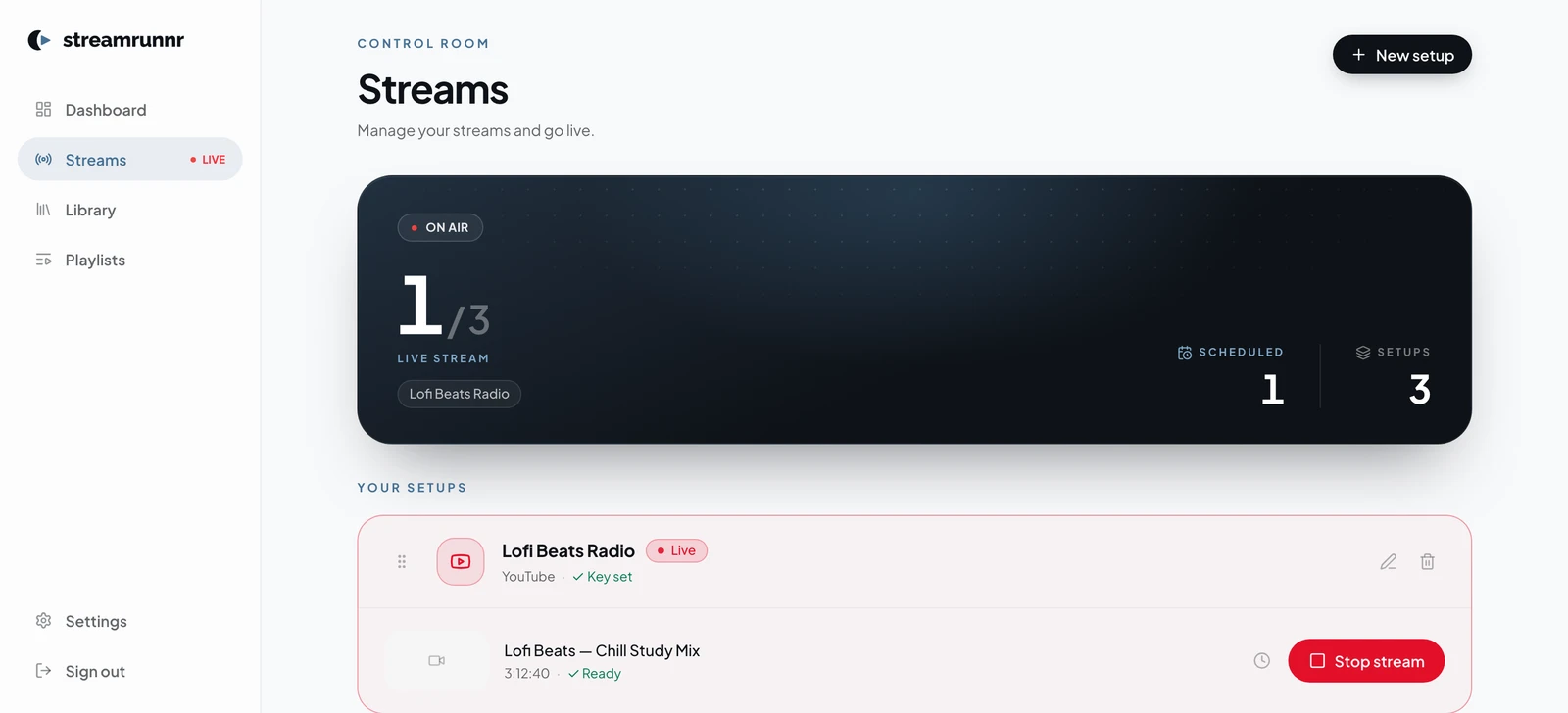
One click to start a hosted stream
Each stream setup connects a video or playlist to a destination. Hit Go Live and streamrunnr handles encoding, delivery, monitoring, and automatic reconnect attempts.
- Stream to YouTube, Twitch, or any custom RTMP endpoint
- Run several streams at once from a single dashboard
- Schedule streams to start automatically at any time
- Automatic reconnect attempts if the connection drops
Plan your streams in advance
Set a start time once and streamrunnr launches your stream automatically — no manual action required, no alarm needed.
- Schedule any stream to start at a specific date and time
- Auto-start fires even when you're completely offline
- Supports YouTube, Twitch, and any RTMP destination
- Cancel a scheduled start anytime before it fires
Build looping playlists visually
Pick videos from your library, arrange them in any order, and enable loop. streamrunnr plays through your playlist repeatedly, looping back to the top until you stop it.
- Drag-and-drop to reorder videos in any sequence
- Loop mode plays your playlist on repeat, around the clock
- “Play Once” mode for one-time broadcasts
- Use the same playlist across multiple stream destinations
See what's running
Your dashboard gives you a live overview of active streams, uptime, scheduled sessions, and recent activity in one place.
- Live status and uptime counter per stream
- Activity feed: stream starts, stops, reconnects, and errors
- Upcoming scheduled streams shown in the dashboard
- Email alerts if a stream needs your attention
Library
3 videos · 2.4 GB stored
Upload complete
Videos are stored and prepared for streaming.
lofi_mix_vol1.mp4
1.2 GB · 1080p
ambient_night.mov
824 MB · 1080p
Lofi Mix 24/7
LiveLofi Mix Playlist
Gaming Highlights
OfflineGaming Highlights
Brand Loop
ScheduledBrand Intro Loop
Uptime: 6h 14m
0 interruptions
Gaming Highlights
Lofi Beats Mix · 4 videos looping
4 videos queued
Looping forever
4 videos · 19:39 total
Lofi Mix 24/7
YouTube is live now
0h 00m
0 interruptions today
Your reusable video library
Upload once and reuse your videos whenever you need them. Your library stores your content in the cloud — no local storage needed and fewer file-management headaches.
- Drag-and-drop upload — MP4, MOV, MKV, WebM, M4V
- Automatic transcoding to stream-ready format
- Reuse any video across multiple streams and playlists
- Manage all your content from one clean interface
Library
3 videos · 2.4 GB stored
Upload complete
Videos are stored and prepared for streaming.
lofi_mix_vol1.mp4
1.2 GB · 1080p
ambient_night.mov
824 MB · 1080p
One click to start a hosted stream
Each stream setup connects a video or playlist to a destination. Hit Go Live and streamrunnr handles encoding, delivery, monitoring, and automatic reconnect attempts.
- Stream to YouTube, Twitch, or any custom RTMP endpoint
- Run several streams at once from a single dashboard
- Schedule streams to start automatically at any time
- Automatic reconnect attempts if the connection drops
Lofi Mix 24/7
LiveLofi Mix Playlist
Gaming Highlights
OfflineGaming Highlights
Brand Loop
ScheduledBrand Intro Loop
Uptime: 6h 14m
0 interruptions
Plan your streams in advance
Set a start time once and streamrunnr launches your stream automatically — no manual action required, no alarm needed.
- Schedule any stream to start at a specific date and time
- Auto-start fires even when you're completely offline
- Supports YouTube, Twitch, and any RTMP destination
- Cancel a scheduled start anytime before it fires
Gaming Highlights
Lofi Beats Mix · 4 videos looping
Build looping playlists visually
Pick videos from your library, arrange them in any order, and enable loop. streamrunnr plays through your playlist repeatedly, looping back to the top until you stop it.
- Drag-and-drop to reorder videos in any sequence
- Loop mode plays your playlist on repeat, around the clock
- “Play Once” mode for one-time broadcasts
- Use the same playlist across multiple stream destinations
4 videos queued
Looping forever
4 videos · 19:39 total
See what's running
Your dashboard gives you a live overview of active streams, uptime, scheduled sessions, and recent activity in one place.
- Live status and uptime counter per stream
- Activity feed: stream starts, stops, reconnects, and errors
- Upcoming scheduled streams shown in the dashboard
- Email alerts if a stream needs your attention
Lofi Mix 24/7
YouTube is live now
0h 00m
0 interruptions today
Professional quality, out of the box
Upload your video files — streamrunnr prepares them automatically so your stream runs smoothly.
What you upload
Common video files in 1080p, 4K, or custom resolutions — no preparation needed.
What gets streamed
Clean, stable output — ready for YouTube, Twitch, or any RTMP destination.
Custom resolutions up to 4K supported
Included at every plan size
Built for every type of channel
Whether you're a solo creator or managing a brand channel, streamrunnr adapts to your content and supports continuous schedules.
24/7 Music Channels
Run continuous lofi, ambient, or synthwave streams. Schedule a playlist once and keep it looping until you decide to stop it.
Gaming Content
Rebroadcast highlights, walkthroughs, or recorded sessions around the clock — even when you're completely offline.
Podcast & Talk Shows
Keep your podcast episodes streaming continuously as a live channel, reaching new viewers at any hour of the day.
Brand & Product Channels
Keep product demos, promos, and brand content continuously available without a live crew or local streaming setup.
Community Channels
Keep your community engaged with themed content, event replays, or curated videos running around the clock.
News & Media
Schedule and loop editorial content, reports, and updates without needing a live broadcast team on standby.
Designed to just work.
Clear plans, no lock-in, and automated monitoring from day one.
Automatic recovery attempts
streamrunnr monitors your stream and attempts to restart it automatically if it drops. If it can't recover on its own, it sends an alert so you can step in.
Straightforward setup
No local streaming software to install. Upload a file, configure a destination, and choose whether to start now or schedule it.
Cancel anytime, keep your library
Cancel from your billing page whenever needed. Your library is retained for 30 days so you can resume without re-uploading during that period.
Pay for the streams you need
Every feature is included at every size. Simple monthly billing; cancel anytime.
$25.00 per stream
Add a second stream and the volume discount starts — up to 25% off.
- 1080p at 60 fps
- 100 GB storage
- No watermarks
- Upload once, reuse anytime
- Automatic processing
- Playlist builder
- YouTube, Twitch & any RTMP
- Loop & Play Once modes
- Schedule streams in advance
- Unlimited streaming hours
- Live monitoring & alerts
- Email support
Need more than 20 streams? — we'll set it up for you.
Prices are final USD prices including applicable taxes. Paddle confirms the authoritative localized total before you place the order.
Common questions
Everything you need to know before getting started.
No. streamrunnr runs your stream on hosted infrastructure, independently of your computer. You can close your laptop or turn off your PC while the service keeps your configured stream running.
YouTube, Twitch, and any RTMP destination. If a platform accepts an RTMP stream key, streamrunnr can push to it — that covers most major platforms and custom media servers.
MP4, MOV, MKV, WebM, and M4V. Once you upload a file, streamrunnr automatically converts it into a clean, stream-ready format — so there's nothing technical for you to set up.
Yes. You choose how many when you build your plan — anything from 1 to 20 — and they all run simultaneously, each to its own platform or destination.
Yes, and they run at the same time — but each destination uses one of your streams rather than riding along on one. Point three streams at the same video, give each a different destination, and the same loop is live on YouTube, Twitch and any RTMP target simultaneously; that is a three-stream plan. It works this way because the video leaves our servers once per platform, so a second destination costs us almost exactly what a second stream does.
Yes. You can cancel at any time from your billing page. An ordinary cancellation normally ends the subscription at the end of the current paid month, and there is no further monthly charge.
Ready to stream —
without running a PC?
Upload your content, configure your stream, and go live — fully automated, no PC needed.
Start today · Cancel anytime